Aadhaar Card New App is one of the most important digital identity documents in India. It is required for banking services, government schemes, mobile verification, taxation, and multiple online services. To make Aadhaar updates more secure and user-friendly, UIDAI has introduced a new official mobile application that allows users to update key Aadhaar details using advanced authentication methods.
What Is the New Aadhaar Official App?
The new Aadhaar official app enables users to update their Aadhaar address and mobile number digitally, without visiting physical centers in many cases. The update process is protected through face authentication, making it more secure than traditional OTP-only verification.
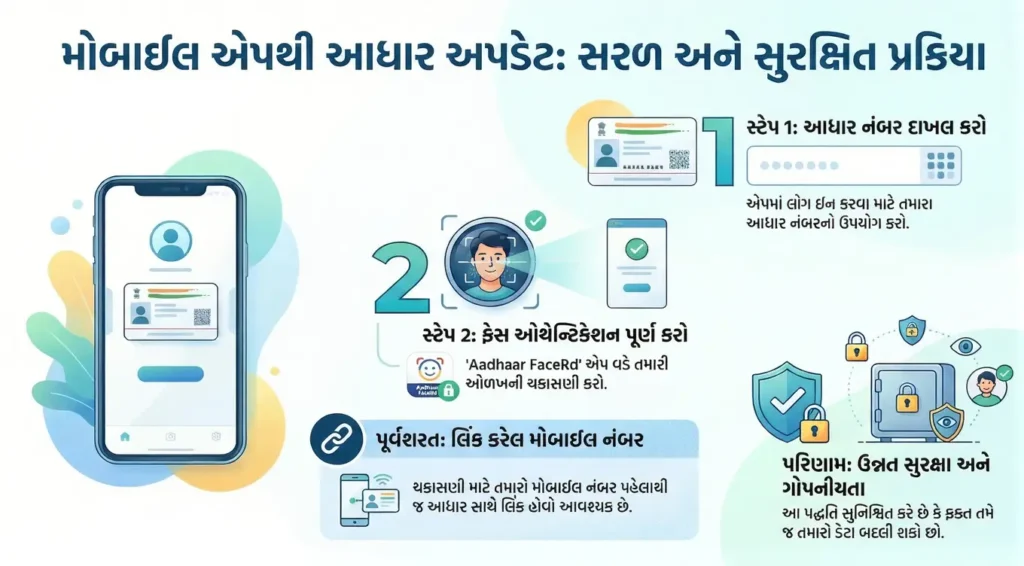
To complete any update, users must already have:
- A valid Aadhaar number
- A mobile number linked with Aadhaar
- The Aadhaar Face Authentication (Aadhaar Facerd) app installed
Aadhaar Details You Can Update Using This App
Using this official application, eligible users can update the following details:
Aadhaar Card New App – Address Update
Users can request an Aadhaar address change digitally. The process includes identity verification through face scanning to ensure authenticity.
Mobile Number Update
The app allows updating or validating the registered mobile number, provided the previous mobile number is already linked to Aadhaar.
Both updates are designed to reduce dependency on physical Aadhaar centers while maintaining strong verification standards.
How the Face Authentication Process Works
Face authentication is a key security feature of this app. Here is how the process works:
- Enter your Aadhaar number in the app
- The system prompts you to complete face verification
- The app redirects to Aadhaar Face Authentication (Facerd)
- Your face is scanned and matched with UIDAI records
- Only after successful verification can the update request proceed
This method ensures that Aadhaar updates are performed only by the genuine Aadhaar holder.
Why Aadhaar Face Authentication Is Mandatory
UIDAI has made face authentication mandatory to:
- Prevent identity fraud
- Stop unauthorized Aadhaar modifications
- Enhance data protection and user privacy
- Strengthen digital KYC processes
Face-based verification adds an additional layer of security beyond OTP and document uploads.
Requirements Before Using the App
Before starting any update, users must ensure:
- Aadhaar number is active
- Mobile number is already linked with Aadhaar
- Aadhaar Face Authentication app is installed
- Mobile camera is working properly
- Stable internet connection
Without these requirements, the update process cannot be completed successfully.
Security and Privacy Standards
This official Aadhaar app follows strict government data protection protocols:
- Encrypted data transmission
- No third-party access
- Limited data usage permissions
- Controlled authentication flow
User information is processed only for verification purposes and is not shared externally.
Who Should Use This App?
This app is especially useful for:
- Individuals who have changed their address
- Users who want to update or verify their mobile number
- People relying on Aadhaar-based digital services
- Users concerned about Aadhaar data security
Conclusion
The new Aadhaar official app is a secure and reliable solution for updating essential Aadhaar details using face authentication. By combining mobile verification with biometric face scanning, UIDAI has strengthened identity protection while making Aadhaar services more accessible.
Users are advised to follow only official procedures and ensure their mobile number remains linked with Aadhaar for uninterrupted services.
Disclaimer: This content is for informational purposes only. We are not associated with UIDAI. Users are advised to use only official government applications and links.